It's a Bar, It's a Scatter, No! It's a Jitter Bar Chart!
What is a Jitter Bar chart? It looks like a COMBINATION of a Bar and a Scatter plot.
Why you use Bar charts - when you want to show values for different groups. They can be used for rankings and visual differences between categories.

Why you use Scatter plots - when you want to identify a pattern between two numerical values. They can also be used to display outliers and show trends in the data.

Adding a Standard Deviation to a Scatter plot helps you to visualize the reliability of data around the mean. In the image above, you see one for the Sales axis and one for the Profit axis.
A Histogram - (not to be confused with a Bar chart as it looks like one!) displays distribution of data rather than distinct categories

So why would you use a Jitter over other charts? You use this when you want to visualize individual data points and when you don't want your plots to overlap! You are also displaying the distribution of the data in these charts.
Here is an example of a Jitter chart for Region. I used the steps here from Donna Cole's Workout Wednesday from February 15th 2023! I simply used the Sample Superstore dataset instead of her Survey one.

So what are we looking at with this chart?
We are looking at the total customers for each Region in the Rows. The totals for each region are the same as displayed in the first bar chart of this article. (618 for Central etc.) The difference is that every dot in this chart is a distinct Customer Name.
But they made a purchase in that Region right? How can I display that in this chart to make it more meaningful for my clients? Andy Kriebel has video here where he approaches this problem a little differently using the same data source of Sample Superstore. He suggested dragging Sales on the SIZE view modifier to quickly display the customers with high sales.
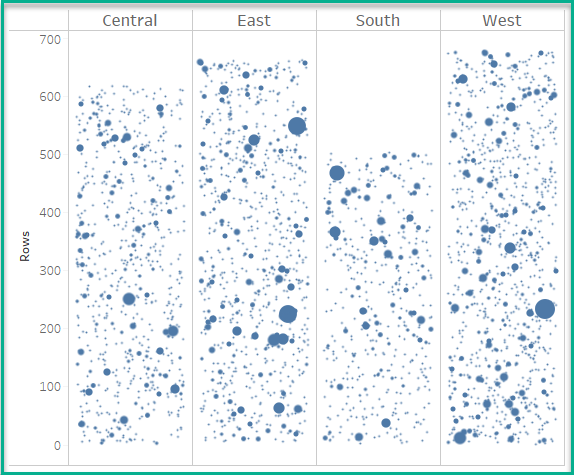
I would prefer a normal Jitter chart for this analysis. There you can see the individual customers but you also have your highest selling customers at the top.

Please note: The Average lines function from the Analysis Pane are not accurate on Jitter charts because of the randomization in the calculation.
